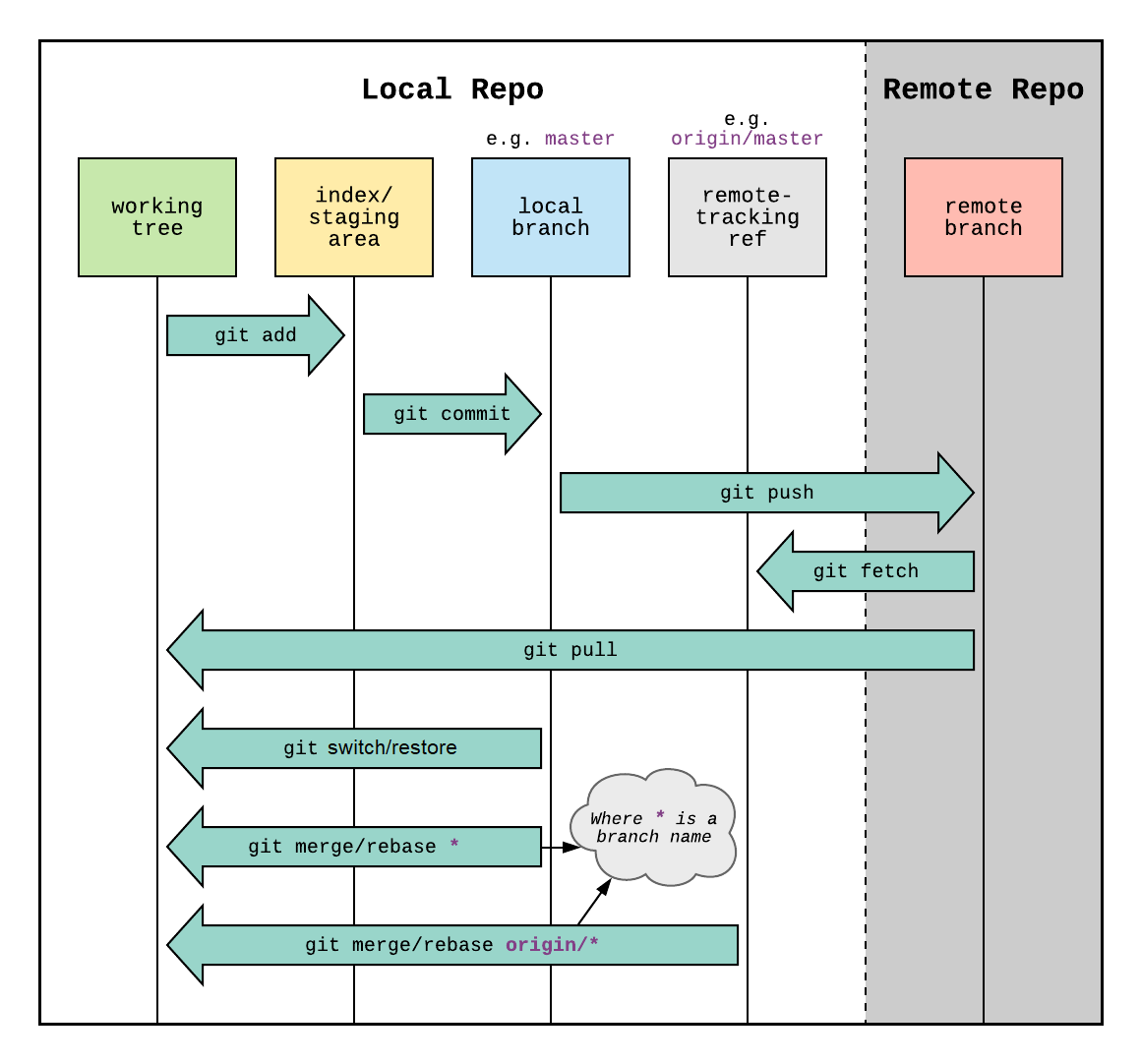
Git
Git is a collaborative code tool. It allows distributed development, with yourself or others.
The database that holds the code, the history of changes to the code is a repository.
Previous version control tools used diffs, which are changes or deltas between files “lines 38 to 42 have changed”, Git is snapshot based.
Every file being tracked is hashed with SHA-1, each and every time a commit is made. Git always knows if files have been changed.
The list of files and their hashes is called the Index.
Terms
Repository
.git/- AKA, Repo
- AKA, the object store.
- Content Addressable Filesystem.
- Key-value based. All of Git is key-value.
- De-Duplicated. If two files have the same SHA-1, git stores 1 blob.
- Git stores: blobs, trees, commits, and tags.
- Interacted with almost purely via
git.
Commits
- Takes a snapshot of the current Index
- SHA-1 entity that points to a specific tree.
- Metadata: author, commiter, timestamp, messages, parent commit.
- Commits are backwards chains.
- All commits store the hash of previous commits.
Tree
- A directory snapshot
- Mode (file type and permissions)
- Name (file or directory)
- SHA-1 (the hash)
- Trees point to blobs and other trees.
Blob
- A key-value pair that represents a file.
82da472f6d00dc5f0a651f33ebb320aa9c7b08d0 LICENSE- The SHA-1 is used to find the compressed content of
LICENSE
Branch
- A named pointer to a specific commit.
- Commits are stored as nodes on a DAG.
- Merge commits have two or more parents.
- The init commit has no parents.
HEAD
- A named pointer to the current branch.
- In detached HEAD state, points directly to a commit.
- Works like the playhead on a tapedeck.
Working Tree
- AKA, project directory.
- AKA, user directory.
- AKA, your files
- This is where project files are modified.
- Directory inside
git initwas ran.
The Index
.git/index- AKA, staging
- AKA, cache.
- AKA, pre-commit.
- AKA, git’s files.
- Invoked with
git add - Adding a file does two things:
- SHA-1 of the file, adding it to the Index.
- Writes the blob to .git/objects/
- Files in the Index are tracked.
Local Files Overview
Git tries to avoid touching working tree files. When a file is added, a snapshot is taken at that time.
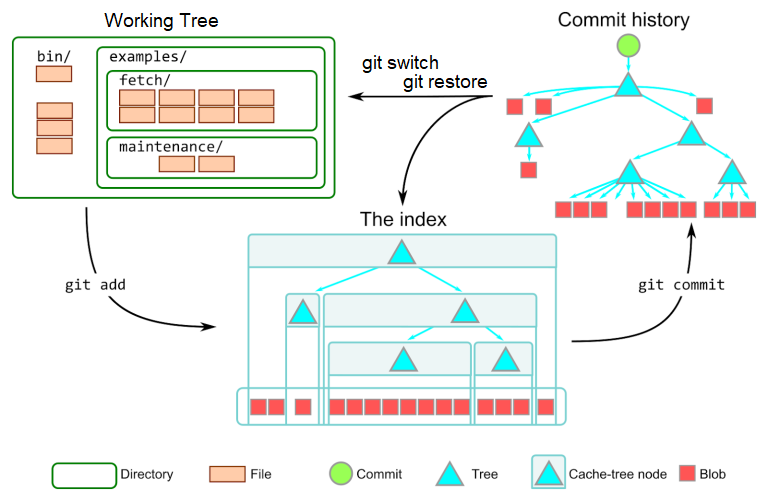
Image courtesy of Derrick Stolee.
Branch Example
gitGraph
   commit id: "A"
   commit id: "B"
   commit id: "C"
   commit id: "D"
   commit id: "HEAD → E"
A, B, C, D are previous commits.
The working tree contains the files from commit E.
I think of it like a tape deck, the HEAD can be played backwards or forwards.
commit moves the HEAD forward, and reset moves the HEAD backwards.
Remote and Local Overview
A basic example: a local repo, and a remote repo.
flowchart TD
    Remote --> Local
    Local --> Remote
The default reference for the remote repo is origin.
Local branches are referenced by name e.g. main
flowchart TD
    Remote[origin/main] --> Local
    Local[main] --> Remote
Pull
To update the local repo to match the remote, use pull
flowchart TD
    Remote[origin/main] -->|pull| Local
    Local[main] --> Remote
git pull
Push
To update the remote repo to match the local, use push
flowchart TD
    Remote[origin/main] --> Local
    Local[main] --> |push|Remote
git push
Git Operations