Enterprise Campus Architecture
The C9000-L series, does not support Catalyst Center, and has lower StackWise speeds.
Two tier collapsed core
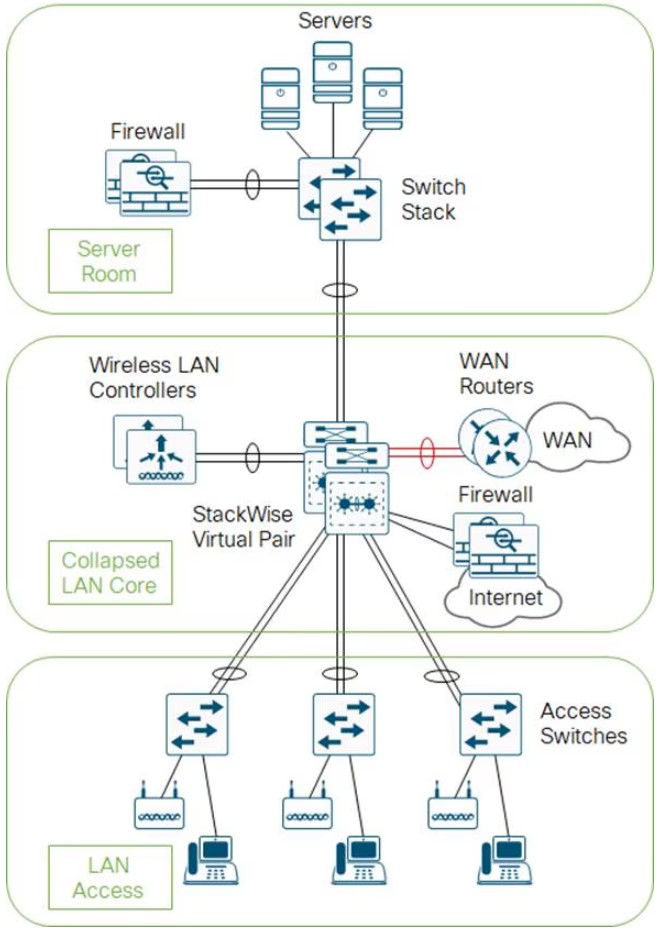
- The core and distribution switches are the same
- The center is running StackWise Virtual
Three tier
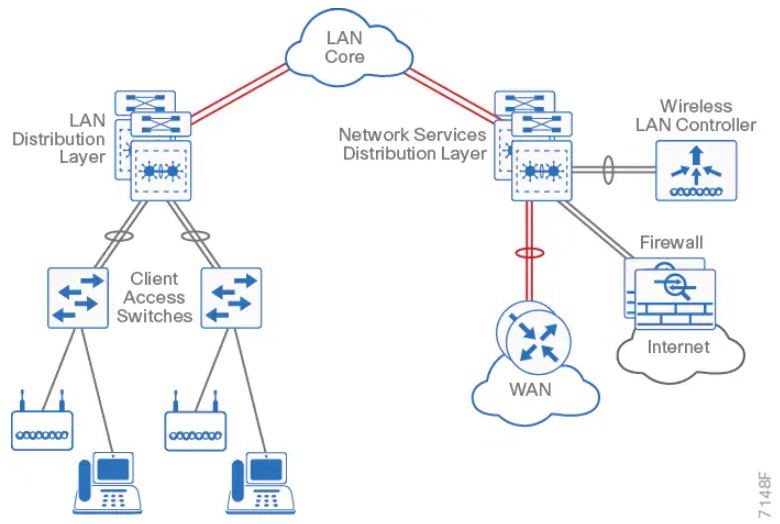
Layer 2 access with traditional multilayer
- Layer 2 is a single wiring closest, or access uplink pair.
- FHRP is used, but limits bandwidth to one uplink, vs both.
The campus network
- Campus networks are always oversubscribed.
- Over-subscription rates between 4-20 are common.
- Networks with over-subscription that results in queuing should implement QoS for voice traffic.
Core layer
Fast and expensive.
Gear
- 9500
- 9600 (modular chassis)
Features
- No services
- Layer 3 only
- Always on
- Ideally, a minimum of 100G to conserve ports.
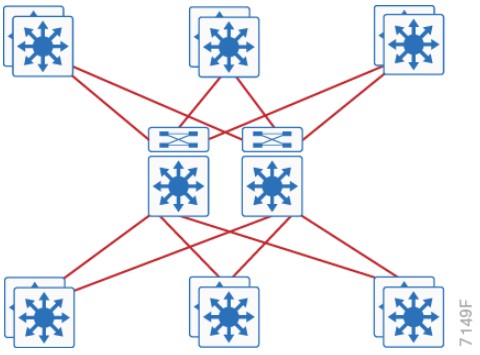
Distribution layer considerations
Purpose
-
Aggregates wiring closets.
-
Protects the core from high-density peering, and access layer problems.
-
Summarize routes towards core
-
Set STP root to be the FHRP Primary
-
Enable
- RootGuard on Downlinks
- Loopguard on Uplinks
-
Disable
- DTP
Gear
- 9400 (modular chassis)
- 9500
- 9600 (modular chassis)
Features
- Service heavy (FHRPs, Routing, SVIs)
- Typical L2 boundary
- Used to interconnect all the access layer switches in a building
- Used to interconnect Access layer switches, once they can’t form a full-mesh
- Also contains the failure domain of the access layer.
- Simplified Distribution, using StackWise Virtual to remove FHRP.
Access layer
Set ports to access ports.
-
Disable
- DTP
-
Enable
- Portfast
- BPDU Guard
- Use Root Guard on designated ports toward downstream switches when the port should participate in STP, but must not accept a superior BPDU
Gear
- 9200 (160Gbps stack-wise ring)
- 9300 (480Gbps stack-wise ring)
- 9400 (modular chassis)
Features
- Switch stacking
- Also provides HA
- POE
- Perpetual Power (survives reboots)
- mGig (Access port speed scaling)
- Port Security
- 802.1x
- Dynamic ARP Inspection
- DHCP Snooping
- Phones
- QoS
- Trust Boundaries
- Auxiliary VLANs
- IP Multicast
- IGMP snooping
- Link Aggregation
- LACP/PAGP
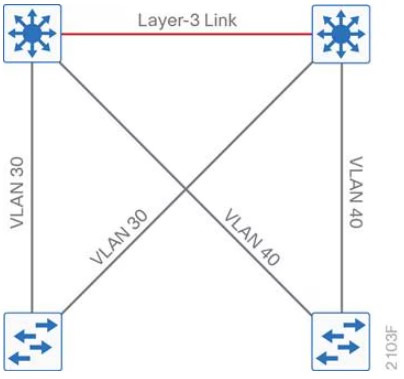
Traditional design
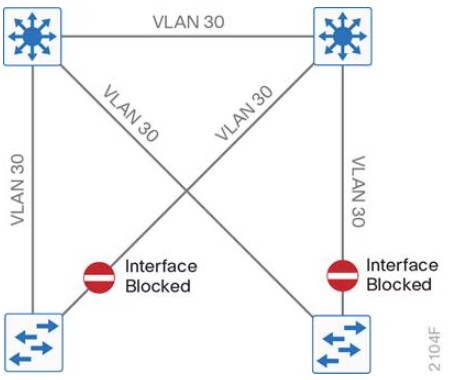
- Needs STP to block ports
- VLANS can span multiple switches.
Traditional design - loop free
- This relies on SVI Autostate.
- VLANs cannot span multiple switches.
Other designs
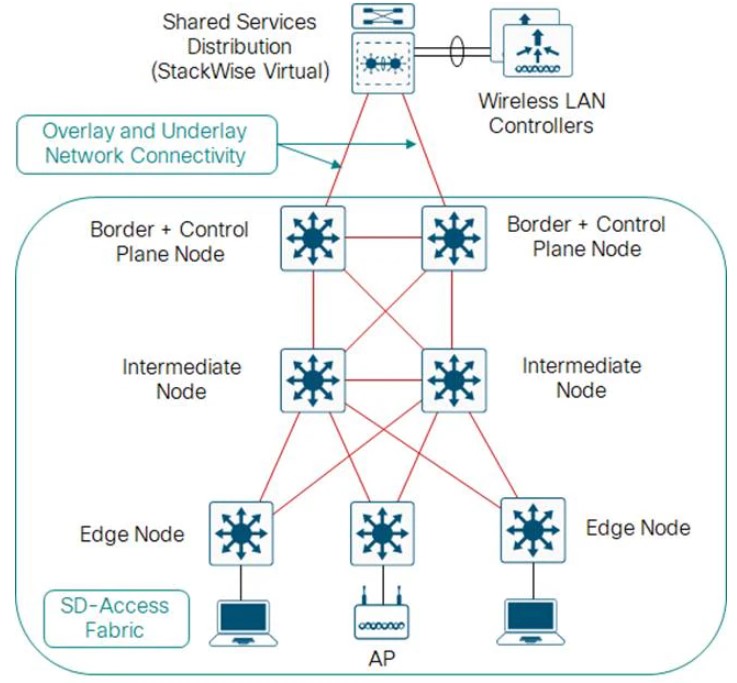
SD-Access
- Cisco Catalyst Center
- Cisco Identity Services Engine
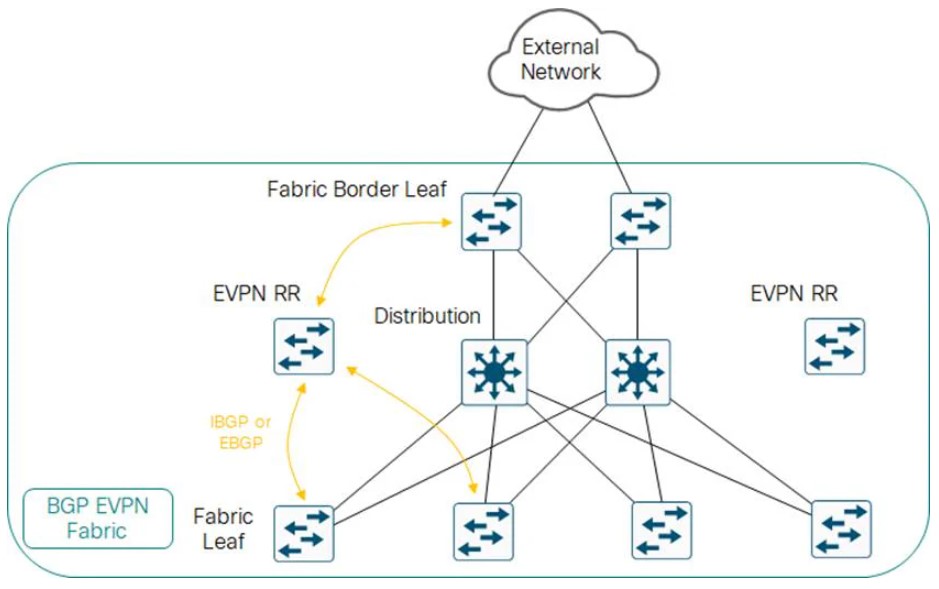
Open standards based overlay
- MP-BGP
- VXLAN
Campus LAN best practices - security
-
DHCP Snooping, to prevent users from hooking up a DHCP server from home on accident.
-
Dynamic ARP inspection, to prevent an ARP attack, where the attack sends ARP replies with the IPs in the subnet.
-
BPDU Guard, to prevent home switches from participating in spanning tree on edge ports.
-
802.1x, port authentication
-
Cisco Umbrella, Cisco’s DNS offering.
Campus LAN best practices - high availability
-
SSO: Stateful Switch Over, used to sync RPs in modular switches.
-
NSF: Non-Stop Forwarding allows graceful restarting of a L3 protocol. Allows the data-plane to continue while the new RP
-
MLS: Multi-layer Switch.
-
StackWise: Older tech, to combine switches together. Up to 8 switches can be stacked. They operate as one switch.
-
StackWise Virtual: Two MLS devices, are combined to become one logical device.
-
StackWise Virtual Link: The control/data path between the two switches. Should be two links minimum.
-
GIR: Graceful Insertion or Removal. Influencing paths by changing route-metrics or adjusting FHRP priorities.
Etherchannel
- Use a dynamic protocol, to check on link health
References
Design Zone - Campus LAN and Wireless LAN Solution Design Guide - Cisco
Enterprise Campus Design - Multilayer Architectures and Design Principles - Cisco Live 2023