Cisco Traceroute
I wrote this trying to understand why my lab equipment had missing ICMP packets.
The answer is ICMP Rate Limiting, but it also covers UDP behavior and how the ports are allocated.
Missing ICMP replies
Topology
10.0.0.1/32     10.0.0.2/32     10.0.0.3/32      10.0.0.4/32       10.0.0.5/32
   │               │               │                │                 │
   │ 10.1.12.0/24  │ 10.3.23.0/24  │  10.1.34.0/24  │  10.3.45.0/24   │
   ▼       │       ▼       │       ▼        │       ▼        │        ▼
┌────┐.1   ▼  .2┌────┐.2   ▼  .3┌────┐.3    ▼  .4┌────┐.4    ▼   .5┌────┐
│    ├──────────┤    ├──────────┤    ├───────────┤    ├────────────┤    │
│ R1 │          │ R2 │          │ R3 │           │ R4 │            │ R5 │
│    ├──────────┤    ├──────────┤    ├───────────┤    ├────────────┤    │
└────┘.1   ▲  .2└────┘.2   ▲  .3└────┘.3    ▲  .4└────┘.4    ▲   .5└────┘
           │               │                │                │
     10.2.12.0/24    10.4.23.0/24     10.2.34.0/24     10.4.45.0/24
- SW: IOS-XE 17.13.01a
- HW: C8000v
- Backend: Enterprise CML
- Single area OSPFv2
- 13 subnets
- Ping works
The Drops
R1# traceroute 10.0.0.5 source 10.0.0.1 probe 5

  1 10.2.12.2 2 msec
    10.1.12.2 1 msec
    10.2.12.2 2 msec
    10.1.12.2 2 msec
    10.2.12.2 1 msec
  2 10.4.23.3 4 msec 3 msec 2 msec 2 msec 3 msec
  3 10.2.34.4 4 msec 4 msec 4 msec 4 msec 4 msec
  4 10.4.45.5 5 msec 5 msec *  5 msec *
Captures are taken between R1 and R2. The output above is from a probe 5 run; the captures use the default 3 probes per hop.
Cisco traceroute uses UDP
The router does not send ICMP packets. It’s purely UDP.
Sent
Frame 1: Packet, 42 bytes on wire (336 bits), 42 bytes captured (336 bits)
Ethernet II, Src: 52:54:00:d8:d7:63 (52:54:00:d8:d7:63), Dst: 52:54:00:81:12:6f (52:54:00:81:12:6f)
Internet Protocol Version 4, Src: 10.0.0.1 (10.0.0.1), Dst: 10.0.0.5 (10.0.0.5)
User Datagram Protocol, Src Port: 49435 (49435), Dst Port: mtrace (33435)
In response it gets an ICMP TTL message.
Received
Frame 2: Packet, 70 bytes on wire (560 bits), 70 bytes captured (560 bits)
Ethernet II, Src: 52:54:00:81:12:6f (52:54:00:81:12:6f), Dst: 52:54:00:d8:d7:63 (52:54:00:d8:d7:63)
Internet Protocol Version 4, Src: 10.1.12.2 (10.1.12.2), Dst: 10.0.0.1 (10.0.0.1)
Internet Control Message Protocol
    Type: Time-to-live exceeded (11)
    Code: 0 (Time to live exceeded in transit)
    Checksum: 0x091f [correct]
    [Checksum Status: Good]
    Unused: 00000000
    Internet Protocol Version 4, Src: 10.0.0.1 (10.0.0.1), Dst: 10.0.0.5 (10.0.0.5)
    User Datagram Protocol, Src Port: 49435 (49435), Dst Port: mtrace (33435)
The payload of the ICMP message is the original UDP packet.
It increments the src and dst UDP ports
udp.srcportlooks like it starts at a randomized ephemeral port and increments for each probeudp.dstportstarts at33434and increments for each probeudp.dstportas a filter will find both the UDP probe and the ICMP reply
This means that each probe pair (the probe and its reply) has a unique and sequential port number.
Each probe set has 1 added to its TTL.
!
! Set 1
!
Probe 1 - udp.dstport == 33434 && udp.srcport == 49305 && ip.ttl == 1
Probe 2 - udp.dstport == 33435 && udp.srcport == 49306 && ip.ttl == 1
Probe 3 - udp.dstport == 33436 && udp.srcport == 49307 && ip.ttl == 1
!
! Set 2
!
Probe 1 - udp.dstport == 33437 && udp.srcport == 49308 && ip.ttl == 2
Probe 2 - udp.dstport == 33438 && udp.srcport == 49309 && ip.ttl == 2
Probe 3 - udp.dstport == 33439 && udp.srcport == 49310 && ip.ttl == 2
!
! Set 3
!
Probe 1 - udp.dstport == 33440 && udp.srcport == 49311 && ip.ttl == 3
Probe 2 - udp.dstport == 33441 && udp.srcport == 49312 && ip.ttl == 3
Probe 3 - udp.dstport == 33442 && udp.srcport == 49313 && ip.ttl == 3
!
! Set 4
!
Probe 1 - udp.dstport == 33443 && udp.srcport == 49314 && ip.ttl == 4
Probe 2 - udp.dstport == 33444 && udp.srcport == 49315 && ip.ttl == 4
Probe 3 - udp.dstport == 33445 && udp.srcport == 49316 && ip.ttl == 4
Pathing
The UDP traffic has unique udp.srcport and udp.dstport per probe.
The returning ICMP traffic (Type 11 from the hops, Type 3 from the destination) is much more constrained.
Important
Each router decides per flow how to route both kinds of packets:
udp&icmpPackets may not return via the path they arrived.
Cisco Traceroute Uses DNS
It works differently depending on DNS.
DNS is on, but broken
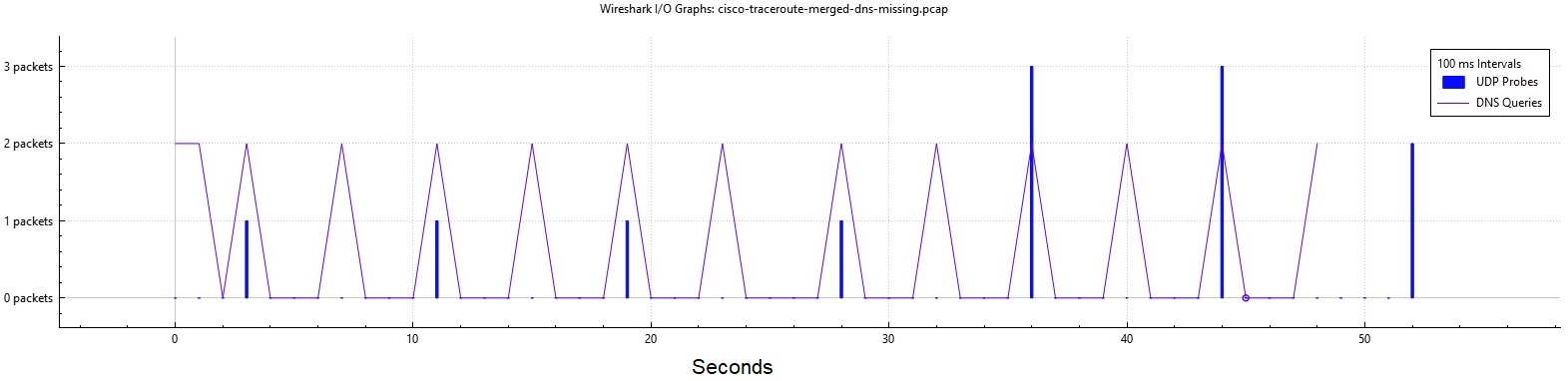
The first four packets are 8 seconds apart. The router requests PTR records for each IP.
It waits for those PTR queries.
12 probes takes about 50 seconds. I get the * in the results.
- cisco-traceroute-link-1-dns-missing.pcap
- cisco-traceroute-link-2-dns-missing.pcap
- cisco-traceroute-merged-dns-missing.pcap
Towards 8.8.8.8 with DNS enabled and working
Note
Exact same router.
The behavior changes when I connect the router to my lab network, and it gets a DHCP address and can reach the open Internet.
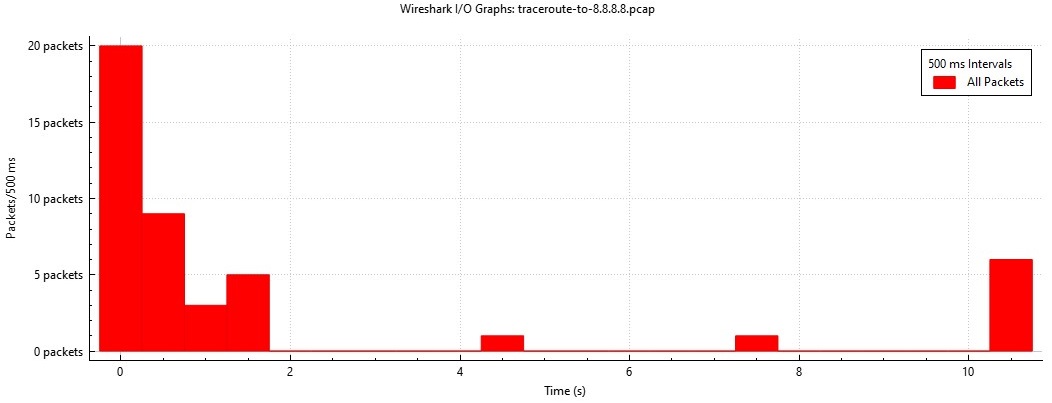
30+ probes complete in a little under 2 seconds. DNS is involved.
Disabling DNS lookups
The delay is reverse DNS: the captures show PTR queries for each newly seen hop address timing out between probes.
I added no ip domain lookup, it’s much faster but I still get the * in the results.
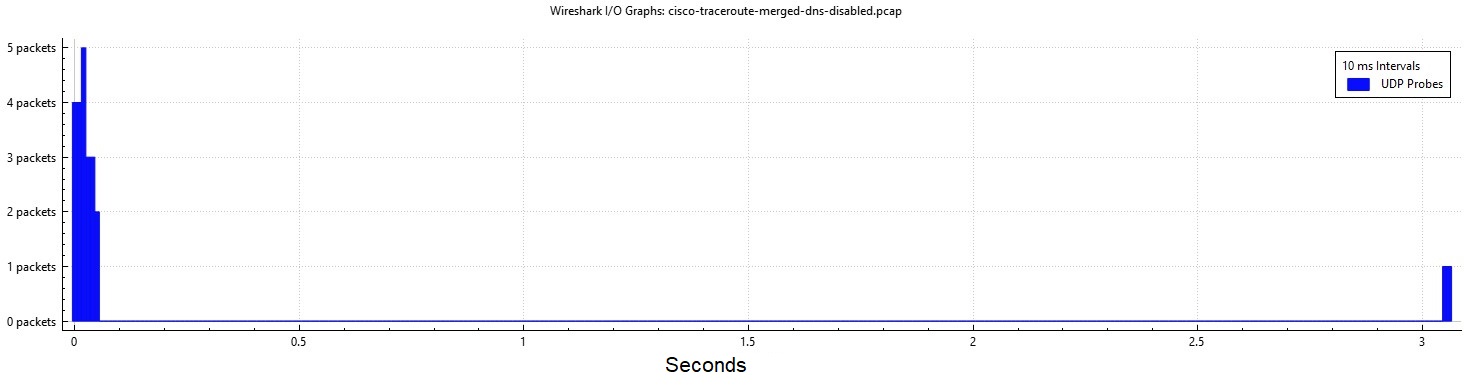
- cisco-traceroute-link-1-dns-disabled.pcap
- cisco-traceroute-link-2-dns-disabled.pcap
- cisco-traceroute-merged-dns-disabled.pcap
ICMP Type 3 Rate Limiting
IOS-XE defaults to 1 ICMP type 3 reply every 500 ms.
These replies are what traceroute needs to show a time result.
R1# show run all | i icmp rate-limit
ip icmp rate-limit unreachable 500
Show dropped replies
Looking at the captures, cisco-traceroute-merged-dns-missing.pcap and cisco-traceroute-merged-dns-disabled.pcap we do see the UDP probes arrive very close together.
If two probes come in too close together, the router will not reply.
Note
These drops will not show up with
debug icmp
R5# show ip icmp rate-limit

                           DF bit unreachables       All other unreachables
Interval (millisecond)     500                       500

Interface                  # DF bit unreachables     # All other unreachables
---------                  ---------------------     ------------------------
GigabitEthernet3           0                         0
GigabitEthernet4           0                         1
Loopback0                  0                         0